Sunday, July 23, 2017
Deploy a Web Project with Maven without Eclipse!
Deploy a Web Project with Maven without Eclipse!
The purpose of this tutorial is the creation of a simple JEE Web Project without using an IDE. Maven will be used to manage the builds, and Tomcat will host the Web Application.
Assumptions
- Maven 3.2.3
- Apache Tomcat Version 7.0.57
- Not using an IDE such as Eclipse
- JDK 1.7.0_71
 $ java -version
 java version "1.7.0_71"
 Java(TM) SE Runtime Environment (build 1.7.0_71-b14)
 Java HotSpot(TM) 64-Bit Server VM (build 24.71-b01, mixed mode)

 $ mvn -ver
 Apache Maven 3.2.3 (33f8c3e1027c3ddde99d3cdebad2656a31e8fdf4; 2014-08-11T13:58:10-07:00)
 Maven home: A:Javapackagesmaven3.2.3 in..
 Java version: 1.7.0_71, vendor: Oracle Corporation
 Java home: C:Program FilesJavajdk1.7.0_71jre
 Default locale: en_US, platform encoding: Cp1252
 OS name: "windows 7", version: "6.1", arch: "amd64", family: "windows"
Outline
- Create a POM for the JEE Web Project
- Add a Servlet
- Configure Tomcat
- Deploy to Tomcat
- Test the Servlet
Create a JEE Web Project using Maven
Im going to create a workspace for my Web Project called "mywebws". Within this workspace, Ill create the JEE Web Project. Ill call this "myweb". Within this folder, Ill create any empty text file called pom.xml.
So far, everything is this simple:
 Directory of A:Javaworkspacesothermywebwsmyweb
 12/05/2014 01:38 PM <DIR> .
 12/05/2014 01:38 PM <DIR> ..
 12/05/2014 01:41 PM 1,104 pom.xml
 1 File(s) 1,104 bytes
Update the POM
The most important file within this web project is the Maven POM file. Were going to start by defining a bare minimum POM file.
We could run a maven archetype that will generate the required folder structure for us automatically, but in reality, this saves very little time. If you understand the POM layout, its just as easy to get started this way.
Simple Web POM
 <project
 xsi_schemaLocation="http://maven.apache.org/POM/4.0.0 http://maven.apache.org/xsd/maven-4.0.0.xsd">
 <modelVersion>4.0.0</modelVersion>

 <groupId>com.mycompany.simple</groupId>
 <artifactId>simple-webapp</artifactId>
 <version>1.0</version>
 <packaging>war</packaging>

 <build>
 <sourceDirectory>src</sourceDirectory>
 <finalName>simple-webapp</finalName>
 </build>

 <properties>

 <maven.compiler.source>1.7</maven.compiler.source>
 <maven.compiler.target>1.7</maven.compiler.target>

 <failOnMissingWebXml>false</failOnMissingWebXml>

 <javax.version>7.0</javax.version>

 <project.build.sourceEncoding>UTF-8</project.build.sourceEncoding>
 <project.reporting.outputEncoding>UTF-8</project.reporting.outputEncoding>
 </properties>

 <dependencies>

 <dependency>
 <groupId>javax</groupId>
 <artifactId>javaee-api</artifactId>
 <version>${javax.version}</version>
 <scope>provided</scope>
 </dependency>

 </dependencies>
 </project>
I want to validate what I have so far, so I type this on the command line
mvn validate -eA:Javaworkspacesothermywebwsmyweb>mvn validate -e
[INFO] Error stacktraces are turned on.
[INFO] Scanning for projects...
[INFO]
[INFO] ------------------------------------------------------------------------
[INFO] Building mycompany-web 7.0
[INFO] ------------------------------------------------------------------------
[INFO] ------------------------------------------------------------------------
[INFO]BUILD SUCCESS
[INFO] ------------------------------------------------------------------------
[INFO] Total time: 0.085 s
[INFO] Finished at: 2014-12-05T13:57:20-08:00
[INFO] Final Memory: 15M/981M
[INFO] ------------------------------------------------------------------------
This demonstrates that the POM file is set up correctly, so far. The Maven POM Tutorial explains each part of this file.
Adding a Servlet
Im going to add a simple variation of the servlet defined here.
My Servlet looks like this:
 package com.mycompany.web.servlets;

 import java.io.IOException;
 import java.io.PrintWriter;
 import javax.servlet.ServletException;
 import javax.servlet.annotation.WebServlet;
 import javax.servlet.http.HttpServlet;
 import javax.servlet.http.HttpServletRequest;
 import javax.servlet.http.HttpServletResponse;

 @WebServlet(
 description = "My Simple Servlet",
 urlPatterns = {
 "/HS",
 "/myservlets/Hello.do"
 }
 )

 public class HelloWorld extends HttpServlet {

 private static final long serialVersionUID = 1L;

 public HelloWorld() {
 super();
 }

 protected void doGet(HttpServletRequest request, HttpServletResponse response) throws ServletException, IOException {
 response.setContentType("text/html");
 PrintWriter out = response.getWriter();
 out.println("Hi There!");
 out.close();
 }

 protected void doPost(HttpServletRequest request, HttpServletResponse response) throws ServletException, IOException {}
 }
Run the
mvn clean package -eSuccessful operational output looks something like this:
 ~mywebwsmyweb>mvn clean package -e
 [INFO] Error stacktraces are turned on.
 [INFO] Scanning for projects...
 [INFO]
 [INFO] ------------------------------------------------------------------------
 [INFO] Building mycompany-web 7.0
 [INFO] ------------------------------------------------------------------------
 [INFO]
 [INFO] --- maven-clean-plugin:2.5:clean (default-clean) @ mycompany-web ---
 [INFO] Deleting ~mywebwsmyweb arget
 [INFO]
 [INFO] --- maven-resources-plugin:2.6:resources (default-resources) @ mycompany-web ---
 [INFO] Using UTF-8 encoding to copy filtered resources.
 [INFO] skip non existing resourceDirectory ~mywebwsmywebsrcmain esources
 [INFO]
 [INFO] --- maven-compiler-plugin:3.1:compile (default-compile) @ mycompany-web ---
 [INFO] Changes detected - recompiling the module!
 [INFO] Compiling 1 source file to ~mywebwsmyweb argetclasses
 [INFO]
 [INFO] --- maven-resources-plugin:2.6:testResources (default-testResources) @ mycompany-web ---
 [INFO] Using UTF-8 encoding to copy filtered resources.
 [INFO] skip non existing resourceDirectory ~mywebwsmywebsrc est esources
 [INFO]
 [INFO] --- maven-compiler-plugin:3.1:testCompile (default-testCompile) @ mycompany-web ---
 [INFO] No sources to compile
 [INFO]
 [INFO] --- maven-surefire-plugin:2.12.4:test (default-test) @ mycompany-web ---
 [INFO] No tests to run.
 [INFO]
 [INFO] --- maven-war-plugin:2.2:war (default-war) @ mycompany-web ---
 [INFO] Packaging webapp
 [INFO] Assembling webapp [mycompany-web] in [~mywebwsmyweb argetmycompany-web]
 [INFO] Processing war project
 [INFO] Webapp assembled in [22 msecs]
 [INFO] Building war: ~mywebwsmyweb argetmycompany-web.war
 [INFO] ------------------------------------------------------------------------
 [INFO] BUILD SUCCESS
 [INFO] ------------------------------------------------------------------------
 [INFO] Total time: 1.487 s
 [INFO] Finished at: 2014-12-05T14:06:40-08:00
 [INFO] Final Memory: 26M/981M
 [INFO] ------------------------------------------------------------------------
Compiler Validation
Its a good idea to become familiar with the output that Maven produces.
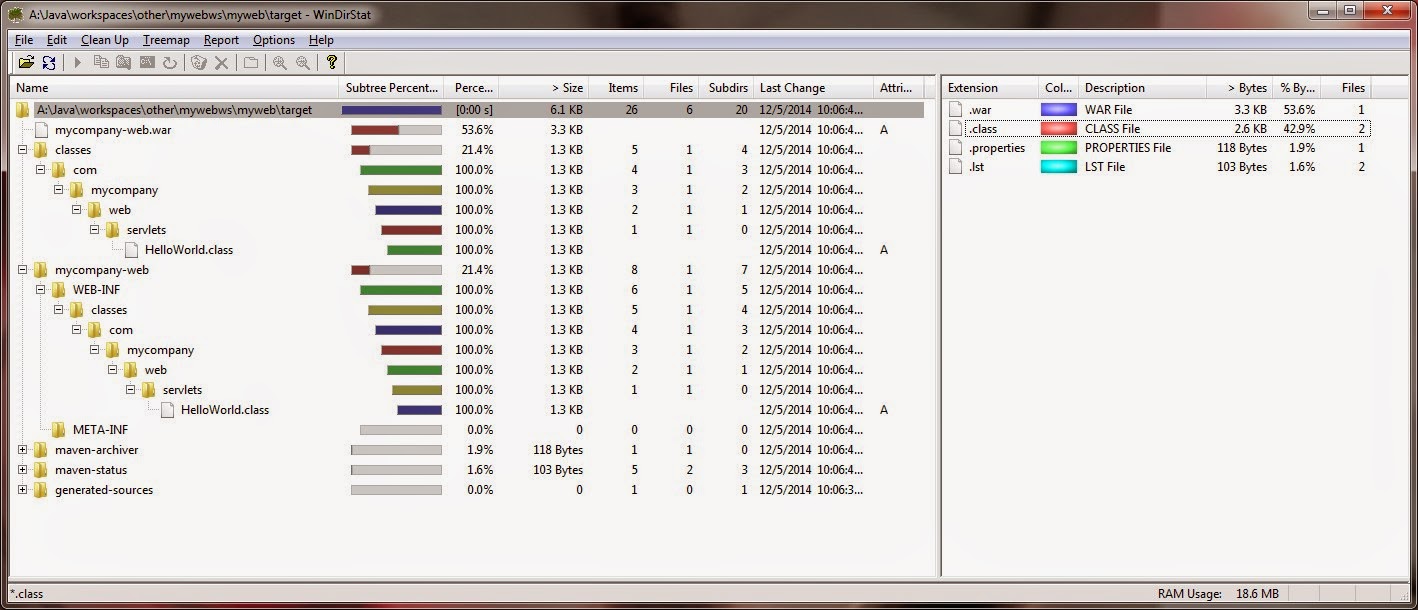
You should have a compiled class file here:
myweb argetclassescommycompanywebservletsHelloWorld.classmycompany-webConfigure POM for Tomcat Deployment
Now we want to configure the POM file to automatically create a WAR file and deploy to Tomcat.
This will require us to add three plugins to our POM file.
 <project
 xsi_schemaLocation="http://maven.apache.org/POM/4.0.0 http://maven.apache.org/xsd/maven-4.0.0.xsd">
 <modelVersion>4.0.0</modelVersion>

 <groupId>com.mycompany.web</groupId>
 <artifactId>mycompany-web</artifactId>
 <version>7.0</version>
 <packaging>war</packaging>

 <build>
 <sourceDirectory>src</sourceDirectory>
 <finalName>mycompany-web</finalName>

 <plugins>

 <plugin>
 <groupId>org.codehaus.mojo</groupId>
 <artifactId>build-helper-maven-plugin</artifactId>
 <version>1.7</version>
 <executions>
 <execution>
 <phase>generate-sources</phase>
 <goals>
 <goal>add-source</goal>
 </goals>
 <configuration>
 <sources>
 <source>src</source>
 </sources>
 </configuration>
 </execution>
 </executions>
 </plugin>

 <plugin>
 <artifactId>maven-compiler-plugin</artifactId>
 <version>3.1</version>
 <configuration>
 <source>1.7</source>
 <target>1.7</target>
 </configuration>
 </plugin>

 <plugin>
 <artifactId>maven-war-plugin</artifactId>
 <version>2.4</version>
 <configuration>
 <warSourceDirectory>WebContent</warSourceDirectory>
 <failOnMissingWebXml>false</failOnMissingWebXml>
 </configuration>
 </plugin>

 <plugin>
 <groupId>org.apache.tomcat.maven</groupId>
 <artifactId>tomcat7-maven-plugin</artifactId>
 <version>2.2</version>
 <configuration>
 <url>http://localhost:8080/manager/text</url>
 <server>TomcatServer</server>
 <path>/test</path>
 <username>craig</username>
 <password>password</password>
 </configuration>
 </plugin>

 </plugins>
 </build>

 <properties>

 <maven.compiler.source>1.7</maven.compiler.source>
 <maven.compiler.target>1.7</maven.compiler.target>

 <failOnMissingWebXml>false</failOnMissingWebXml>
 <javax.version>7.0</javax.version>

 <project.build.sourceEncoding>UTF-8</project.build.sourceEncoding>
 <project.reporting.outputEncoding>UTF-8</project.reporting.outputEncoding>

 </properties>

 <dependencies>
 <dependency>
 <groupId>javax</groupId>
 <artifactId>javaee-api</artifactId>
 <version>${javax.version}</version>
 <scope>provided</scope>
 </dependency>
 </dependencies>

 </project>
After modifying the POM, its a good idea to validate the structure using
mvn validate -eModify Tomcat Settings for Maven
Add a Maven specific configuration to the TOMCAT_HOME/conf directory.
add a settings.xml file with this information
 <?xml version="1.0" encoding="UTF-8"?>
 <settings>
 <servers>
 <server>
 <id>TomcatServer</id>
 <username>craig</username>
 <password>password</password>
 </server>
 </servers>
 </settings>
This file is part of the maven settings and is not specific to tomcat, though the tomcat-maven-plugin uses the servers defined there
Within your Maven POM file of the Web application you are deploying
 <plugin>
 <groupId>org.apache.tomcat.maven</groupId>
 <artifactId>tomcat7-maven-plugin</artifactId>
 <version>2.2</version>
 <configuration>
 <url>http://localhost:8080/manager/text</url>
 <server>TomcatServer</server>
 <path>/test</path>
 <username>craig</username>
 <password>password</password>
 </configuration>
 </plugin>
Deploying the Servlet
Assuming our configuration is correct, we can create and deploy a WAR using a single command
mvn tomcat7:deploySuccessful operational output for me looks like this:
A:Javaworkspacesothermywebwsmyweb>mvn tomcat7:deploy -e
[INFO] Error stacktraces are turned on.
[INFO] Scanning for projects...
[INFO]
[INFO] ------------------------------------------------------------------------
[INFO] Building mycompany-web 7.0
[INFO] ------------------------------------------------------------------------
[INFO]
[INFO] >>> tomcat7-maven-plugin:2.2:deploy (default-cli) > package @ mycompany-web >>>
[INFO]
[INFO] --- build-helper-maven-plugin:1.7:add-source (default) @ mycompany-web ---
[INFO] Source directory: A:Javaworkspacesothermywebwsmywebsrc added.
[INFO]
[INFO] --- maven-resources-plugin:2.6:resources (default-resources) @ mycompany-web ---
[INFO] Using UTF-8 encoding to copy filtered resources.
[INFO] skip non existing resourceDirectory A:Javaworkspacesothermywebwsmywebsrcmain esources
[INFO]
[INFO] --- maven-compiler-plugin:3.1:compile (default-compile) @ mycompany-web ---
[INFO] Changes detected - recompiling the module!
[INFO] Compiling 1 source file to A:Javaworkspacesothermywebwsmyweb argetclasses
[INFO]
[INFO] --- maven-resources-plugin:2.6:testResources (default-testResources) @ mycompany-web ---
[INFO] Using UTF-8 encoding to copy filtered resources.
[INFO] skip non existing resourceDirectory A:Javaworkspacesothermywebwsmywebsrc est esources
[INFO]
[INFO] --- maven-compiler-plugin:3.1:testCompile (default-testCompile) @ mycompany-web ---
[INFO] No sources to compile
[INFO]
[INFO] --- maven-surefire-plugin:2.12.4:test (default-test) @ mycompany-web ---
[INFO] No tests to run.
[INFO]
[INFO] --- maven-war-plugin:2.4:war (default-war) @ mycompany-web ---
[INFO] Packaging webapp
[INFO] Assembling webapp [mycompany-web] in [A:Javaworkspacesothermywebwsmyweb argetmycompany-web]
[INFO] Processing war project
[INFO] Copying webapp resources [A:JavaworkspacesothermywebwsmywebWebContent]
[INFO] Webapp assembled in [23 msecs]
[INFO] Building war: A:Javaworkspacesothermywebwsmyweb argetmycompany-web.war
[INFO]
[INFO] <<< tomcat7-maven-plugin:2.2:deploy (default-cli) < package @ mycompany-web <<<
[INFO]
[INFO] --- tomcat7-maven-plugin:2.2:deploy (default-cli) @ mycompany-web ---
[INFO] Deploying war to http://localhost:8080/test
Uploading: http://localhost:8080/manager/text/deploy?path=%2Ftest
Uploaded: http://localhost:8080/manager/text/deploy?path=%2Ftest (4 KB at 3176.8 KB/sec)
[INFO] tomcatManager status code:200, ReasonPhrase:OK
[INFO] OK - Deployed application at context path /test
[INFO] ------------------------------------------------------------------------
[INFO]BUILD SUCCESS
[INFO] ------------------------------------------------------------------------
[INFO] Total time: 2.582 s
[INFO] Finished at: 2014-12-05T14:34:23-08:00
[INFO] Final Memory: 32M/981M
[INFO] ------------------------------------------------------------------------
The web application can be undeployed by typing
mvn tomcat7:undeploy -eTesting the Servlet
I used these annotations to define the deployment path:
 @WebServlet(
 description = "My Simple Servlet",
 urlPatterns = {
 "/HS",
 "/myservlets/Hello.do"
 }
 )
and I can test in a browser by typing:
http://localhost:8080/test/myservlets/Hello.do
References
- Server Configuration and Deployment
- [Maven Documentation] Maven Server Configuration
- The repositories for download and deployment are defined by the repositories and distributionManagement elements of the POM. However, certain settings such as username and password should not be distributed along with the pom.xml. This type of information should exist on the build server in the settings.xml.
- [Java Thinking] Deploying to Tomcat 7 with Maven
- Short and Simple Tutorial
- [Stackoverflow] Settings.xml
- The settings.xml file is part of the maven settings and is not specific to tomcat, though the tomcat-maven-plugin uses the servers defined there.
- POM Editing and Conventions:
- [Maven Documentation] Naming Conventions
- Guide to naming conventions on groupId, artifactId and version.
- The POM Editor
- I prefer to use Notepad++ for XML editing.
- Eclipse also has a form-based POM editor.
Troubleshooting
- Connection Refused
 [INFO] ------------------------------------------------------------------------
 [INFO] BUILD FAILURE
 [INFO] ------------------------------------------------------------------------
 [INFO] Total time: 9.099 s
 [INFO] Finished at: 2015-01-05T12:49:10-08:00
 [INFO] Final Memory: 14M/384M
 [INFO] ------------------------------------------------------------------------
 [ERROR] Failed to execute goal org.apache.tomcat.maven:tomcat7-maven-plugin:2.2:deploy (default-cli) on project sandbox-simple: Cannot invoke Tomcat manager: Connection refused: connect -> [Help 1]
 org.apache.maven.lifecycle.LifecycleExecutionException: Failed to execute goal org.apache.tomcat.maven:tomcat7-maven-plugin:2.2:deploy (default-cli) on project sandbox-simple: Cannot invoke Tomcat manager
 at org.apache.maven.lifecycle.internal.MojoExecutor.execute(MojoExecutor.java:216)
 at org.apache.maven.lifecycle.internal.MojoExecutor.execute(MojoExecutor.java:153)
 at org.apache.maven.lifecycle.internal.MojoExecutor.execute(MojoExecutor.java:145)
 at org.apache.maven.lifecycle.internal.LifecycleModuleBuilder.buildProject(LifecycleModuleBuilder.java:116)
 at org.apache.maven.lifecycle.internal.LifecycleModuleBuilder.buildProject(LifecycleModuleBuilder.java:80)
 at org.apache.maven.lifecycle.internal.builder.singlethreaded.SingleThreadedBuilder.build(SingleThreadedBuilder.java:51)
 at org.apache.maven.lifecycle.internal.LifecycleStarter.execute(LifecycleStarter.java:120)
 at org.apache.maven.DefaultMaven.doExecute(DefaultMaven.java:347)
 at org.apache.maven.DefaultMaven.execute(DefaultMaven.java:154)
 at org.apache.maven.cli.MavenCli.execute(MavenCli.java:582)
 at org.apache.maven.cli.MavenCli.doMain(MavenCli.java:214)
 at org.apache.maven.cli.MavenCli.main(MavenCli.java:158)
 at sun.reflect.NativeMethodAccessorImpl.invoke0(Native Method)
 at sun.reflect.NativeMethodAccessorImpl.invoke(NativeMethodAccessorImpl.java:62)
 at sun.reflect.DelegatingMethodAccessorImpl.invoke(DelegatingMethodAccessorImpl.java:43)
 at java.lang.reflect.Method.invoke(Method.java:483)
 at org.codehaus.plexus.classworlds.launcher.Launcher.launchEnhanced(Launcher.java:289)
 at org.codehaus.plexus.classworlds.launcher.Launcher.launch(Launcher.java:229)
 at org.codehaus.plexus.classworlds.launcher.Launcher.mainWithExitCode(Launcher.java:415)
 at org.codehaus.plexus.classworlds.launcher.Launcher.main(Launcher.java:356)
 Caused by: org.apache.maven.plugin.MojoExecutionException: Cannot invoke Tomcat manager
 at org.apache.tomcat.maven.plugin.tomcat7.AbstractCatalinaMojo.execute(AbstractCatalinaMojo.java:141)
 at org.apache.tomcat.maven.plugin.tomcat7.AbstractWarCatalinaMojo.execute(AbstractWarCatalinaMojo.java:68)
 at org.apache.maven.plugin.DefaultBuildPluginManager.executeMojo(DefaultBuildPluginManager.java:132)
 at org.apache.maven.lifecycle.internal.MojoExecutor.execute(MojoExecutor.java:208)
 ... 19 more
 Caused by: java.net.ConnectException: Connection refused: connect
 at java.net.DualStackPlainSocketImpl.connect0(Native Method)
 at java.net.DualStackPlainSocketImpl.socketConnect(DualStackPlainSocketImpl.java:79)
 at java.net.AbstractPlainSocketImpl.doConnect(AbstractPlainSocketImpl.java:345)
 at java.net.AbstractPlainSocketImpl.connectToAddress(AbstractPlainSocketImpl.java:206)
 at java.net.AbstractPlainSocketImpl.connect(AbstractPlainSocketImpl.java:188)
 at java.net.PlainSocketImpl.connect(PlainSocketImpl.java:172)
 at java.net.SocksSocketImpl.connect(SocksSocketImpl.java:392)
 at java.net.Socket.connect(Socket.java:589)
 at org.apache.http.conn.scheme.PlainSocketFactory.connectSocket(PlainSocketFactory.java:117)
 at org.apache.http.impl.conn.DefaultClientConnectionOperator.openConnection(DefaultClientConnectionOperator.java:178)
 at org.apache.http.impl.conn.ManagedClientConnectionImpl.open(ManagedClientConnectionImpl.java:304)
 at org.apache.http.impl.client.DefaultRequestDirector.tryConnect(DefaultRequestDirector.java:610)
 at org.apache.http.impl.client.DefaultRequestDirector.execute(DefaultRequestDirector.java:445)
 at org.apache.http.impl.client.AbstractHttpClient.doExecute(AbstractHttpClient.java:863)
 at org.apache.http.impl.client.CloseableHttpClient.execute(CloseableHttpClient.java:82)
 at org.apache.tomcat.maven.common.deployer.TomcatManager.invoke(TomcatManager.java:742)
 at org.apache.tomcat.maven.common.deployer.TomcatManager.deployImpl(TomcatManager.java:705)
 at org.apache.tomcat.maven.common.deployer.TomcatManager.deploy(TomcatManager.java:388)
 at org.apache.tomcat.maven.plugin.tomcat7.deploy.AbstractDeployWarMojo.deployWar(AbstractDeployWarMojo.java:85)
 at org.apache.tomcat.maven.plugin.tomcat7.deploy.AbstractDeployMojo.invokeManager(AbstractDeployMojo.java:82)
 at org.apache.tomcat.maven.plugin.tomcat7.AbstractCatalinaMojo.execute(AbstractCatalinaMojo.java:132)
 ... 22 more
 [ERROR]
 [ERROR] Re-run Maven using the -X switch to enable full debug logging.
 [ERROR]
 [ERROR] For more information about the errors and possible solutions, please read the following articles:
[ERROR] [Help 1] http://cwiki.apache.org/confluence/display/MAVEN/MojoExecutionException - Solution:
- Make sure the Tomcat Server is started locally
- eg. $TOMCAT_HOME instartup.sh
- FAIL - Deployed application at context path /sample but context failed to start
- This is a common error message with a variety of possible solutions.
- The assumption is that the project build and the server deployment were successful, but the WAR artifact was unable to start on the server.
- This means that both the project (by itself) and the server (by itself) are working properly, but when taken together, there is some incompatibility.
- Possible Solution:
- My Maven POM configuration had the JDK version 1.8 in the source and target element text areas.
- [StackOverflow] Tomcat 7 is only compatible with JDKs 6 and 7.

Thursday, June 15, 2017
Deep Web Dunia Informasi Yang Tersembunyi
Deep Web Dunia Informasi Yang Tersembunyi


Dalam Deep Web, navigasinya sangat berbeda dengan Web biasa, setiap pencarian lebih kompleks dikarenakan tidak adanya indeks dari konten.

Friday, June 9, 2017
Deploy Golang Web Application to Heroku cloud Platform
Deploy Golang Web Application to Heroku cloud Platform
I hope reader of this post has already installed Golang package and have basic knowledge about golang and basic skill about git not mandatory.
I am using go1.6 version on Linux-Ubuntu machine for this post.
sujin@sujin:~$ lsb_release -d
Description: Ubuntu 14.04.4 LTS
sujin@sujin:~$ go version
go version go1.6 linux/amd64
Setup Go directory structure and set GOPATH env variable. add GOPATH/bin to PATH env variable.
set working directory in GOPATH
sujin@sujin:~$ echo $GOPATH
/home/sujin/godir/work
Register in heroku website to get free account https://signup.heroku.com/?c=70130000001x9jFAAQ
install heroku tool belt
Pull the HerokuTest project from git
Now push your application to git heroku master
Tuesday, May 2, 2017
Designers create a web site with no code Adobe Muse now in beta
Designers create a web site with no code Adobe Muse now in beta
Posted via email from colby pre-posterous
Friday, April 21, 2017
Debug your web page for different versions of Internet Explorer with one 1 free program
Debug your web page for different versions of Internet Explorer with one 1 free program
How many times have you had to reproduce client problems on your web pages using a virtual machine or multiple PCs running different versions of Internet Explorer?
You dont have to do that anymore. Now you can debug your pages on multiple versions of IE on the same machine that you use for Web development or testing. 
IETester for Windows Internet Explorer is a stand-alone (free) browser compatibility checker for Internet Explorer versions from 5.5 to 9. It is a visual tool that makes it faster and easier to test your sites � it uses the rendering and javascript engines of IE9 preview, IE8, IE7 IE 6 and IE5.5 on Windows 7, Vista and XP, as well as the installed IE in the same process. You can then navigate to the different pages and enter data as if you had installed the different versions of IE on your computer.
It�s free, but why not make a donation to support the project? Donate now

And, look at their other product: DebugBar:
- DOM Inspector: View DOM Tree and modify tags attributes and css attributes on the fly to test your page
- HTTP Inspector: View HTTP/S request to check cookies, GET and POST parameters, view server info
- Javascript Inspector and Javascript Console: View javascript functions for easier debugging, see Javascript and AJAX code
- HTML Validator: Validate HTML code to correct and optimize your code and html size of your page
- And many more features: See page cookies, get pixel colour on a page, make a page screenshot...