Showing posts with label save. Show all posts

Thursday, May 4, 2017

Decide where to save downloads from the internet Mozilla Firefox

Decide where to save downloads from the internet Mozilla Firefox


Deciding where to save downloads from the internet is important, because you are allowed to save them exactly where you will find them when in need of.

Lets say you have downloaded a list of files, containing pictures, documents, videos, audios, just to have them saved randomly  in just any location the system wishes to save them. It really is annoying having to spend all the time searching for files you didnt take note of the names, it is not easy to find and you know that, just because you did not choose a particular location for the file.

With Mozilla Firefox, you have the right to choose where to save your downloads. With other browsers i have not tried but i think it does same. If you know how to use Mozilla Firefox then your on the safer side because its the most common and most used browser round the world.

Lets get going, so you dont have to spend the whole time searching for files you did not check on the names when downloading. 

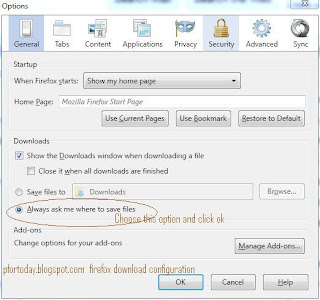
1. Click options in the Firefox  Menu Bar.

2. In the general tab witch should be the first tap, select the radio button (Always ask me where to save files)

3. Confirm with OK and your download settings are set and ready. Try downloading a file and you
will be asked where to save in your computer.
You can decide to create several folders that will hold downloaded files according to how you will understand them. Mostly there are already created folders in which you just have to choose to save what corresponds the folder. Some of this folders can be.


In Downloads. (My Documents)


Music
Videos
Programs
Documents


The above default folders corresponds almost all types of files you can download from the internet. 


 A file will only download after you click save.


 wait till the download process is done. Bellow is also an example of locating the downloaded file. 
 
The open containing folder option takes you directly where the downloaded file is saved.


Read more »

Friday, April 7, 2017

DeaDBeeF save and reset configuration

DeaDBeeF save and reset configuration


Especially since the GUI is configurable, it may be useful to save the customized configuration or reset to default.

To save a certain configuration, backup the directory `/home/@user/.config/deadbeef`; to reset to defaults, delete that directory (it is absent by default).
Read more »

Saturday, April 4, 2015

Best Task killer for Android 2014 App killer to save Battery Life

Best Task killer for Android 2014 (App killer to save Battery Life)

Its been a long time since I have shared something on brainytuts.com. Today I came across a topic which I thought useful to android users. In this submit I am going to share the best android app killer apps. Latest android versions does not need an Independent task killer app, so use the app killer apps for android apps mentioned below if you are totally sure about it. The integrated task killer that comes with android is capable of multitasking efficiently. Installing a separate android app killer would consume your battery instead of saving it. Below are the some of the best app killer apps for android. 
Recommended:
How to Download Paid Android Apps APK for Free in 1 Step
app killer for android
Easy task killer advanced: Best Task killer for Android
Easy task killer advanced is 1st on the list. It was one of the first task killer apps on google apps. With an average rating of 4.6 it’s fantastic app to save your battery. Developed by 2easyteam, it has got 10 million downloads.
Features
  • Shake optimize feature that allows you to kill apps just by shaking your android smart phone.
  • Auto optimize feature which automatically kills apps.
  • Ignore list that skips the applications that you don’t want to kill.
  • Memory meter and one click optimization a perfect option to kill background apps with a go.
  • Last but not the least, it is absolutely free of charge.
task killer android
Simple task killer: One of the best Android app killer
With a rating of 4.5 simple task cleaner is favourite of many android users. As the name suggests it indeed is the simplest app killer for android. It’s an app that surely increases your battery life and simplest to operate.
Super task killer  
Super task killer is Another app killer android app which is hugely popular. It has received average rating of 4.0 from android users. It has al the features of easy task killer advanced. You can also kill selected apps.
Advanced task cleaner 2.0 
Advanced task cleaner 2.0 is available for android users 2.0 and above. With an average rating of 4.3 is deserves an installation if you did not like the above two apps. Rest of the features are same.
Final words  
There are many app killer apps apart from these 4. We believe these are the best app killers apps for android. As I said at the start of the article, latest android versions does not need separate task killer apps. So, it’s best not use any of them and rely on integrated task manager.  
Read more »