Showing posts with label downloads. Show all posts
Showing posts with label downloads. Show all posts
Thursday, May 4, 2017
Decide where to save downloads from the internet Mozilla Firefox
Decide where to save downloads from the internet Mozilla Firefox
Deciding where to save downloads from the internet is important, because you are allowed to save them exactly where you will find them when in need of.
Lets say you have downloaded a list of files, containing pictures, documents, videos, audios, just to have them saved randomly in just any location the system wishes to save them. It really is annoying having to spend all the time searching for files you didnt take note of the names, it is not easy to find and you know that, just because you did not choose a particular location for the file.
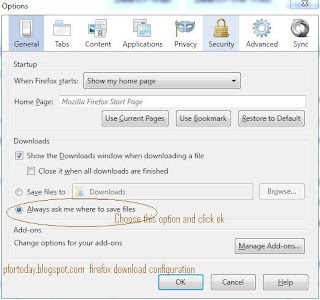 With Mozilla Firefox, you have the right to choose where to save your downloads. With other browsers i have not tried but i think it does same. If you know how to use Mozilla Firefox then your on the safer side because its the most common and most used browser round the world.
Lets get going, so you dont have to spend the whole time searching for files you did not check on the names when downloading.
1. Click options in the Firefox Menu Bar.
2. In the general tab witch should be the first tap, select the radio button (Always ask me where to save files)
3. Confirm with OK and your download settings are set and ready. Try downloading a file and you
will be asked where to save in your computer.
You can decide to create several folders that will hold downloaded files according to how you will understand them. Mostly there are already created folders in which you just have to choose to save what corresponds the folder. Some of this folders can be.
In Downloads. (My Documents)
Music
Videos
Programs
Documents
The above default folders corresponds almost all types of files you can download from the internet.

A file will only download after you click save.
wait till the download process is done. Bellow is also an example of locating the downloaded file.

The open containing folder option takes you directly where the downloaded file is saved.
Lets say you have downloaded a list of files, containing pictures, documents, videos, audios, just to have them saved randomly in just any location the system wishes to save them. It really is annoying having to spend all the time searching for files you didnt take note of the names, it is not easy to find and you know that, just because you did not choose a particular location for the file.
Lets get going, so you dont have to spend the whole time searching for files you did not check on the names when downloading.
1. Click options in the Firefox Menu Bar.
2. In the general tab witch should be the first tap, select the radio button (Always ask me where to save files)
3. Confirm with OK and your download settings are set and ready. Try downloading a file and you
will be asked where to save in your computer.
You can decide to create several folders that will hold downloaded files according to how you will understand them. Mostly there are already created folders in which you just have to choose to save what corresponds the folder. Some of this folders can be.
In Downloads. (My Documents)
Music
Videos
Programs
Documents
The above default folders corresponds almost all types of files you can download from the internet.
A file will only download after you click save.
wait till the download process is done. Bellow is also an example of locating the downloaded file.
The open containing folder option takes you directly where the downloaded file is saved.

Thursday, April 27, 2017
DB2 Express C downloads restored
DB2 Express C downloads restored
We had a days outage last week during which the DB2 Express-C database server was unavailable for download. The error was on our end, and weve put processes in place to make sure it does not happen again. All the downloads are back online.
Database server
DB2 Express-C is a free relational database server. Its exactly the same code as industrial strength servers like DB2 Enterprise. You can create databases of any size with DB2 Express-C and use many advanced features.
- DB2 Express-C for Windows
- DB2 Express-C for Windows x64
- DB2 Express-C for Linux
- DB2 Express-C for Linux x86-64
- DB2 Express-C for Linux on POWER
- DB2 Express-C for Solaris x86-64
Administrative tools
Data Studio Standalone lets you create and edit tables, views, triggers, SQL and XQuery queries, and other related goodness. It replaces the Control Center (but not the Health Center or the Task Center, which are staying around).
- Data Studio Standalone for Windows
- Data Studio Standalone for Linux
Developer tools
Data Studio IDE includes all the administrative functionality of Data Studio Standalone plus the ability to develop Java stored procedures. DB2 also integrates with .NET development thanks to DB2 Add-Ins for Visual Studio.
- Data Studio IDE
- DB2 Add-Ins for Visual Studio
Free books
These free books are aimed to get anyone started with DB2. Weve had lots of positive feedback from both university students and industry professionals who used them to learn the technology.
- Getting started with DB2 Express-C
- Getting started with IBM Data Studio for DB2
Cheers,
Leons Petrazickis
DB2 Express-C Community Team
Subscribe to:
Posts (Atom)