Saturday, July 29, 2017
Dengan Software Ini Anda Bisa Ganti Sign in Background Windows 10
Dengan Software Ini Anda Bisa Ganti Sign in Background Windows 10
BACA JUGA : Windows 10 Version 1511 resmi dirilis
Download Win10BG Changger 1.2.0.0
Download Win10BG Changger 1.2.0.0
Cara Mengganti Gambar Sign-in Background Windows 10

- Extract file zip/rar dari Win10BG Changger 1.2.0.0
- Masuk ke Folder GUI, Kemudian Klik kanan "W10 Logon BG Changer", Pilih "Run As Administrator"
- Jika muncul kotak dialog "EULA" klik Yes.
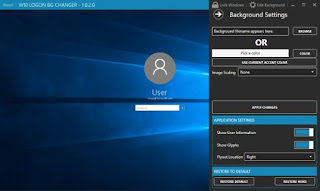
- Kemudian akan muncul tampilan utama Win Logon BG Changer.
- Klik "Edit Background", kemudian Klik Tanda sebelah kanan "Background File name appears here" untuk memilih gambar yang akan kita jadikan background.
- Klik Apply Change.

Friday, July 28, 2017
Delete admin Password without software
Delete admin Password without software

Delete admin Password without software.
Connect hard disk with another working pc & delete SAM & SAM.log files from
c:WindowsSystem32config
Are u expert in Assembly Language?
then Crack Windows Programs,
Go to command prompt and type debug
>enter
type ?
>enter
start to crack
Tuesday, July 18, 2017
Default Software Application List in Linuxmint13 xfce
Default Software Application List in Linuxmint13 xfce
This is a list of softwares which come with LinuxMint13 xfce by default. You can access them all in native environment without any further download or update. I took these screen-shot from live desktop. Day by day Linux Mint getting a higher position in the desktop war. In this moment LinuxMint posses first position in Distrowatch.com site. So, I love to introduce this "Instant Ready No Problem" Linux distribution with my friends. Here is the application list which come with LinuxMint13xfce by default.
 |
| LinuxMint13xfce Accessories sub-menu |
Accessories sub-menu include:
- Application Finder
- Archive Manager
- Calculator
- Catfish
- Character Map
- Disk Utility
- Document Viewer
- ImageWriter
- Screenshot
- Task Manager
- Thunar File Manager
- Tomboy Notes
- gedit
 |
| Graphics Sub-menu in Linux Mint 13 xfce |
- Document Viewer
- GIMP Image Editor
- Image Viewer
- LibreOffice Draw
- Simple Scan
- gThumb
 |
| Internet sub-menu |
- Firefox Web Browser
- Pidgin Internet Manager
- Thunderbird Mail
- Transmission
- XChat iRC
 |
| Multimedia softwares by default in Linux Mint 13 xfce |
- Banshee
- Brasero
- GNOME MPlayer
- Mixer
- Movie Player
- PulseAudio Volume Control
- Sound Recorder
- VLC media player
 |
| Office suite Libre office in LinuxMint13xfce |
- Dictionary
- LibreOffice
- LibreOffice Base
- LibreOffice Calc
- LibreOffice Draw
- LibreOffice Impress
- LibreOffice Writer
 |
| many tools are added in Settings |
- Settings Manager
- Accessibility
- Additional Drivers
- Appearance
- Bluetooth Manage
- Desktop
- Disk Utility
- Display
- File Manager
- IcedTea Web Control Panel
- Input Method Switcher
- Keyboard
- Language Support
- MIME Type Editor
- Mouse and Touchpad
- Network Connections
- Open JDK Java 6 Policy Tool
- Panel
- Passwords and Keys
- Power Manager
- Preferred Applications
- Removable Drives and Media
- Screensaver
- Session And Startup
- Settings Editor
- Software Sources
- Welcome Screen
- Window Manager
- Window Manager Tweaks
- Workspaces
 |
| System Sub men |
Handful collection of tools are added by default in System sub menu.
- APTonCD
- Backup Tool
- Bulk Rename
- Disk Usage Analyzer
- Domain Blocker
- Firewall Configuration
- GParted
- Install Linux Mint
- Login Window
- Network Tools
- New Login
- Printing
- Software Manager
- Synaptic Package Manager
- System Information
- Task Manager
- Update Manager
- Upload Manager
- Windows Wireless Drive
 |
| Software Manager in linuxmint 13 xfce |
Friday, June 23, 2017
DDOS menggunakan Software DDOS DoserPower1 1
DDOS menggunakan Software DDOS DoserPower1 1
DDOS Software DoserPower1.1

- kpai.go.id
- icmi.or.id
- ahok.org
- Klik DoserPower1.1.exe
- isi time ddos nya (rekomendasi 500)
- kemudian isi target server nya dengan IP atau link korban
- isi packets yang ingin dikirimkan ( rekomendasi 100 karena nanti akan memuat banyak thereats )
- Kemudian selesai deh....
Saturday, May 27, 2017
Design websites that sell learn 7 CMS software from scratch
Design websites that sell learn 7 CMS software from scratch

Download
Saturday, April 29, 2017
Dell Introduces De dupe Appliance Moves Compellent To 64 bit Software
Dell Introduces De dupe Appliance Moves Compellent To 64 bit Software
 |  | | ||||||||
| ||||||||||
Dell has introduced its de-duplication appliance based on its Ocarina technology and upgraded the software for its enterprise-class Compellent storage line with 64-bit technology.
The moves, along with others including a new storage solution for Microsoft SharePoint and new storage support for its own Force10 and for Brocade technology, were unveiled at the Dell Storage Forum in London.
The updates to Dells storage lines came in the wake of several acquisitions in the last couple of years which have turned Dell from a developer of low-end storage and a reseller of EMCs enterprise storage to one of the top providers of enterprise-class storage based on its own intellectual property.
�As a result, Dell now has a number of different technologies which it can start applying across its multiple storage lines,� said Mike Davis, Director, Product Marketing, NAS and Back-up Storage Products, Dell.
"It will be a long process to bring these together with a common management platform. It is part of our five-year storage roadmap," said Davis.
Dell has already taken its first step toward unifying its storage technologies. The company in October started integrating networking technology from its August acquisition of networking vendor Force10 Networks into its Dell vStart virtualization infrastructure offering and added compression technology from its July, 2010 acquisition of Ocarina Networks into its DX Object storage platform.
At the London event, Dell unveiled Compellent Storage Center 6.0, the first major upgrade of the Compellent storage arrays operating system since Dell acquired Compellent last year.
�The biggest change is transition from the previous 32-bit architecture to a new 64-bit architecture,� said Bob Fine, Director, Product Marketing, Dell Compellent.
�The new code base is also more agile than in the past with the ability to upgrade to new protocols such as SAS and FCoE (Fibre Channel over Ethernet) via plug-in cards,� he added.
Dell has also added integration with CommVaults data protection software to provide improved resiliency of data stored on Compellent hardware.
�Also new with Dell Compellent is enhanced integration with VMware for virtualized data center environments. This includes the addition of VMware vSphere storage APIs to speed up the deployment of virtual machines and significantly improve storage performance for data volumes shared by multiple virtual machines,� said Fine.
�The arrays also now support VMwares Site Recovery Manager (SRA) 5 for automated failback from a disaster, as well as VMware technology for managing Compellent virtualized storage pools,� he added.
Dell also used the London event to introduce its first de-dupe appliance based on its Ocarina technology. That device, the DR4000, decreases disk capacity requirements by up to a factor of 15 times, and provides inline de-dupe and compression and replication of de-duped data. It provides backup storage for as low as 25 cents per GB list price, Dell said.
�The DR4000 targets the backup needs of remote and branch offices as well as traditional businesses,� Davis said. �Therefore, it is really focused on the channel.�
The DR4000 is not Dells first de-dupe appliance. The company also offers the DL2200, an appliance built around CommVaults Simpana de-dupe application.
�Going forward, Dell plans to increase the capacity of the DR4000, and integrate its capabilities with Dells EqualLogic and Compellent product lines and the Dell cloud,� said Davis.
Dell also unveiled its new Dell solution for Microsoft SharePoint Infrastructure Optimization, which combines Dell DX storage appliances; Dell Microsoft SharePoint assessment, design, and deployment services; and the AvePoint DocAve software for managing migration and other features.
�The result is an integrated solution for SharePoint lifecycle management and migration that improves capacity utilization, performance, business continuity, and compliance,� said Davis.
Dell also validated its Dell Force10 S481010-Gbit Ethernet switch and its deep-buffer S60 1-Gbit/10-Gbit Ethernet switches for its EqualLogic storage appliance line, giving the EqualLogic auto-recognition and auto-configuration features.
Dell also integrated support for its Dell PowerConnect 8024 10GB switches and M8024-k Blade IO modules in its Compellent array lines to integrate them in the field in a single step.
Also new is support for Brocades new 16GB Fibre Channel infrastructure with its Compellent line.
Dells new Compellent Storage Center 6.0 software and DR4000 dedupe appliance are slated to be released sometime this calendar quarter.