Showing posts with label dell. Show all posts
Showing posts with label dell. Show all posts
Saturday, July 29, 2017
Dell optiplex GX280 Driver
Dell optiplex GX280 Driver

Dell Gx280 Drivers
Audio:
Analog Devices-Driver
Ethernet-Driver:
Broadcom-Driver
VGA-Driver:
Intel-Driver

Tuesday, July 25, 2017
Dell Inspiron3521 7Beeps Codes Diagnostic Solution
Dell Inspiron3521 7Beeps Codes Diagnostic Solution
If the following pop up dialog appears on your Pc screen every time you turn on your Pc or restarting.
 |
| line0 |
This massage is caused by verecno Worm
Also this can come together with the following #Worm
The verecno worm drops the following files:
C:GoogleAutoit3.exe
C:GoogleGoogle.lnk
C:GoogleWindowsupdate.lnk
C:GoogleGoogleUpdate.lnk
C:GoogleGoogleUpdate.a3x
%User Startup%GoogleUpdate.lnk
%User Startup%GoogleUpdate.a3x
%User Startup%WindowsUpdate.lnk
{removable drive letter}:Hot.lnk
{removable "}:Movies.lnk
{removable "}:My Games.lnk
{removable "}:My Pictuers.lnk
{removable "}:My Videos.lnk
Follow below steps to get rid of this error
- Press Win+r,
- type regedit and enter.
- Now press ctrl+f,
- type googleupdate.lnk and hit find.
 |
| line0 |
Windows registry search and show detect entries under
HKEY_CURRENT_USERSoftwareMicrosoftWindowsCurrentVersionRun
and
HKEY_LOCAL_MACHINESoftwareMicrosoftWindowsCurrentVersionRun
HKEY_CURRENT_USERSoftwareMicrosoftWindowsCurrentVersionRun
and
HKEY_LOCAL_MACHINESoftwareMicrosoftWindowsCurrentVersionRun
path just delete it and hit find to found next.
Do the same with autoit3.exe, windowsupdate.lnk, googleupdate.a3and others!!
Sunday, July 23, 2017
Dell Compellent
Dell Compellent
� Mixing RAID types within a pool or disk group set is possible
� Tiering is done at 2 MB by default, though administrators have the option to manage storage blocks at 512 KB or 4 MB pages
� Tiering profiles can be applied to single LUNs or groups of LUNs
� Profiles specify not only the tiers to be used for each volume, but also the disk types, rotational speeds and RAID levels within each tier.
� With Dell Compellent there is no write penalty for migrating data to lower tiers.
Tiered storage solutions within traditional storage architectures cannot deliver the same level of write performance. In those solutions, data is written to a particular block and kept in that block. If the block is migrated to tier 3 and a new write comes in for that volume, the write will occur on tier 3.
� Dell Compellent snapshots do not reside within the volume with production data � they sit outside the production volume in pages within the general virtual storage pool
� Dell Compellent Fast Track augments Automated Tiered Storage by delivering optimal placement of data on each individual disk.
Fast Track uses the intelligence continuously collected by the Dell Compellent system to identify the most active, frequently accessed blocks of data on each spindle. It then places those data blocks together on the outer tracks of each drive. Keeping the head focused on that one area of the disk, where the active data resides, delivers better performance than if the head were forced to move all over the disk.
� Writes are always written to tier 1 RAID 10, large sequential write workloads will hit tier 1,
Migration occurs automatically at a set time defined by the user, or on demand, while the system is
still online. The migration process runs in the background and does not affect data availability or
application performance. There is no need to bring down an application, pause I/O or wait for a
minimum I/O requirement. If a read request comes in to a page that is being moved, the request is
satisfied from the original placement of the page. The page is then moved after the read is complete.
If a write request comes in, it will not interfere with the migration process, as new information is
always written to tier 1, RAID 10�and therefore is not eligible for migration. Overwriting a block of
protected information also occurs on tier 1, RAID 10, so moving a block of data receiving writes simply
will not occur. There is never a situation when application I/O is denied�application requests always
receive priority.
In the Dell Compellent architecture, new data is written by default to tier 1, RAID 10 storage to
provide the best write performance.
� Activating the tiering functionality requires a module-specific license, but perpetual licensing ensures that organizations only incur additional licensing expenses when adding more capacity to an existing system. Upgrading to a new controller with the latest technologies does not require a new software license, as is the case with other solutions.
� In the Dell Compellent architecture, new data is written by default to tier 1, RAID 10 storage to provide the best write performance. Replays move to a lower storage tier with RAID 5 or 6 protection during the next migration cycle within a 24-hour window. And over time, according to the tiering profile, infrequently accessed blocks of data move to a lower storage tier and RAID level, or to a different RAID level within the same tier. Moving this read-only data from RAID 10 to RAID 5 within the same tier enables administrators to maintain the same read performance.
Not sure that that read performance will be the same when a block of data within a tier is moved between RAID types (RAID 5 read perform is superior to RAID 10)
� When new data needs to be written to an existing block that has since been converted to read-only and migrated to a lower tier, those writes are redirected to the tier 1, RAID 10 storage. A new writable block is automatically allocated to provide the highest transaction performance. Virtual pointers utilize the use characteristics of those blocks to maintain data continuity. All data is written to tier 1, yet snaphsots move to the lower tier available within 24 hours for the highest write and read performance possible. Virtual pointer retain continuity between all associated blocks.
Wednesday, July 19, 2017
Dell GX270N Drivers
Dell GX270N Drivers

Dell GX270N Drivers
Audio:
Creative Labs-Patch/Upgrade
Applies to:
Sound Blaster Live! 24-bit
Creative Labs-Patch/Upgrade
Applies to:
Sound Blaster Live! 5.1 Digital
Analog Devices-Driver
Applies to:
ADI 198x Integrated Audio
Network:
Intel-Driver
Applies to:
Gigabit LOM
VGA Driver:
Intel-Driver
Applies to:
82865G Graphics Controller
Tuesday, July 18, 2017
Dell sells Ubuntu But its NOT recommended says this CSR
Dell sells Ubuntu But its NOT recommended says this CSR
Surely, I am an advocate of Dell (and system76.com, and now HP for mobile mi(its Ubuntu)) because of their GUTS to sell GNU/Linux to end users! That being said, I wanted for people to see this story to raise awareness. Regular people are getting pushed around, being discouraged from choice, and soldiers of freedom MUST ANSWER! BRING IT ON!!
read more | digg story
Sunday, July 16, 2017
Dell Optiplex 755
Dell Optiplex 755
Optiplex 755

Intel-Driver:-
VGA Driver
Applies to:
G31/G33/Q33/Q35 Graphics Controller
Audio Driver
Applies to:
ADI 198x Integrated HD Audio
EtherNet Driver
Applies to:
5721C1 NetXtreme Gigabit Ethernet PCI-E
BCM95722 PCI-E NIC
Saturday, July 15, 2017
Dell EqualLogic
Dell EqualLogic
The following notes were taken during an interesting meeting we had with a delegation from Dell. The post is composed in the form of a question and answers session for clarity of presentation � even though most of the information was intelligently proferred without any initial question � and the questions are not put in any particular order. The answers are not the words of the Dell delegates themselves, and I apologize in advance if there is any mis-representation.
Q: Does EqualLogic support dedupe?
A: No, dedupe is not a feature provided by EqualLogic. If you are looking for an excellent, cost-effective dedupe appliance, we can highly recommend the DR4000. The DR4000 uses inline dedupe, and it is packed with high-levels of processing power to enable high-throughput levels. This storage is highly recommended for backup storage and allows for replication of deduped backups off site.
Note: Not recommended to run production/live virtual machines off this.
Q: What snapshot mechanism does EqualLogic use?
A: EqualLogic uses the Allocate-On-Write (AOW) snapshot mechanism. This has performance advantages over the Copy-On-Write (COW) mechanism, and also allows for the live mounting of volume snapshots without affecting the primary volume.
Notes: The following extract explaining Copy-On-Write versus Allocate-On-Write is taken from http://www.dcig.com/2011/03/another-look-at-what-is-the-best-snapshot.html
A copy-on-write snapshot incurs a performance penalty anytime previously written data is changed. In these circumstances, the previously written block of data first has to be read, re-written to another block of storage and then the new data written where the other data previously resided.
Allocate-on-write conversely "freezes" data that was previously written and writes changes to that data elsewhere on other disk. This eliminates the three step "read, rewrite and write" process associated with copy-on-write and reduces snapshots to just one step - a write.
Q: Does EqualLogic support Synchronous Replication?
A: Not yet, this is in the pipeline.
Q: Does EqualLogic support a Thin Provisioned LUN Space Reclaimer?
A: Not yet, this is in the pipeline.
Q: What best practices do you recommend as regards RAID setup?
A: This all depends on the environment and use scenario, which is why Dell have invested $1000000s in developing DPACK (Dell Performance Analysis Collection Kit) which is available to partners. The DPACK can be run over a typical working day to pick up various disk utilization statistics, and will then recommend which EqualLogic model(s) to go for, and the recommended RAID setup.
Q: Does EqualLogic support data auto tiering / load balancing (intelligent data tiering)?
A: Yes!
Notes: The following extract is taken from http://up2v.nl/2011/10/30/dell-equallogic-version-5-1-firmware-overview/
Dell added a new loadbalancer called Automatic Performance Load Balancer or APLB. This automatically moves blocks of data between pools of different controllers, RAID set or disk types. This means you can create a pool of disk drives containing different characteristics, like SAS and nearline SAS or SATA. As a administrator you do not have to worry anymore where to place the data. Also when administrator finds out an application needs more iops, he does not need to move data manually to high performance tier of storage. APLB will make sure the most accessed data will be placed on the fastest drives (the drives with the least latency).
For consideration: Consider the intelligent moving of blocks of data by the storage array to maximize storage performance, versus VMware vSphere 5s Storage DRS which has to move the entire datastore � which one do you think is better?
Q: How expandable is an EqualLogic PS-Series Array?
A: EqualLogics are expanded by purchasing additional PS-Series Arrays. You can have up to 16 members in a group and 8 in a pool. The members can be different models of EqualLogic, with different types of disks. And there is no reason why you cannot continue to expand your group over time keeping the older EqualLogics in place and adding additional EqualLogics as need arises. The older PS-Series appliances going back over 7+ years continue to support the latest firmware and features, and the current models will continue to do the same, future-proofing and maximizing the return on your investment.
Q: Can I buy storage shelves to expand my EqualLogic PS-Series Array?
A: No. The reasoning behind this is that as you add more storage shelves to a controller unit, the demand placed on that controller unit goes up and up. Also, adding more shelves to a controller unit does not increase the number of I/O ports. With the EqualLogic you expand by adding additional PS-Series storage arrays, linearly increasing the number of high performance controllers and I/O ports.
Q: Can I mix and match different types of disk in an EqualLogic PS-Series Array?
A: No, each separate array will have a set of identical disks. Within a pool you can have different types of arrays with SATA, SAS, etcetera...
Note: An exception is the PS6100XS which has 7 SSDs and 17 SAS drives with intelligent data tiering.
Q: Which EqualLogic Array would you recommend for VDI deployments?
A: An excellent storage appliance to use for VDI solutions is the PS6100XS, this specialist unit has 7 SSDs and 17 SAS drives, and uses intelligent data tiering. Youd be looking at running 250 typical virtual desktops from just one unit.
Note (i): Dont take my word for this, please check with your Dell partner first. It may well be that you will get more much more than 250 virtual desktops running off one PS6100XS.
Note (ii): A certain world famous retail company uses 3 of the predecessor units to the PS6100XS, to service a near 1000 desktop VMware View VDI farm.
Q: Does EqualLogic do CIFS/NFS?
A: The EqualLogic FS7500 is designed for CIFS/NFS implementations. Essentially you just present the storage as shares, there are no LUN configurations required.
Note: Traditionally EqualLogic arrays have always been iSCSI.
Q: Why does EqualLogic not support having active/active controllers?
A: This is a very good question. EqualLogic runs the active and passive controllers connected by a thick I/O pipe that effectively maintains the passive controller as a mirror of the active controller, this allows for near instantaneous failover in the event of a RAID controller failure � there is no need for the controller having to seize ownership of the failed controllers disks. This is supported by write cache mirroring and the write cache is cached to flash memory.
Note: The process of controller failover uses MAC spoofing and needs portfast and rapid spanning tree enabled on switches.
Q: Nothing to do with EqualLogic per-se � are 3.5" disks faster than 2.5" disks?
A: Technically speaking, with the same disk spin speed, if your data blocks are on the edge of a 3.5" disk it will be slightly faster read/write than if it were on the edge of a 2.5" disk. In practice there is nothing really in it (especially if you can pack in more 2.5" disks and thus have more spindles which means more IOPs.)
Tuesday, July 4, 2017
Dell is utterly bizarre
Dell is utterly bizarre
Dell has a gorgeous new laptop . . . almost out. Pictures are on various blogs. The thing is thinner than a MacBook Air and has an intriguing and showy way of folding open. So, youd think thered be mention of the product on Dells website? Youd think, but no!
Who are the people running these companies?
Another example: everyone knows the new BlackBerry Storm2 is launching. Vodaphone has it on their website. It will obviously launch with Verizon in the United States. The Verizon CEO wanders around Manhattan showing off the phone to random people. So, youd think thered be mention of the product on Verizons website? Youd think, but no! Pictures are in obscure place on its website but are impossible to find.
Who are the children running these companies?? Do they really think they are capable of going up against an adult company like Apple? It boggles the mind . . .
Thursday, June 29, 2017
Dell Inspiron 15 laptop gaming terbaru dari Dell
Dell Inspiron 15 laptop gaming terbaru dari Dell
Dell Inspiron 15 laptop gaming terbaru dari Dell

AGEN SABUNG AYAM - Dell Indonesia hari ini (04/04) memperkenalkan laptop Inspiron 15 Gaming baru yang ditujukan untuk memenuhi kebutuhan para penggemar game di Indonesia. Hadir dengan komponen dan desain yang mengedepankan kinerja paling agresif, laptop Inspiron 15 Gaming ini dilengkapi dengan sistem operasi Windows 10, prosesor Intel quad core dan discrete graphics tangguh, baterai berdaya tahan lama serta harga yang kompetitif. Laptop gaming Dell Inspiron 15 (7567) telah tersedia di Indonesia dengan harga mulai dari Rp 12.599.000,-
Catherine Lian, Managing Director Dell EMC Indonesia dalam sambutannya mengatakan bahwa tidak semua orang bermain game dengan cara yang sama. Karenanya Dell kini menawarkan kepada para gamer pilihan harga dan sistem laptop yang lebih baik dengan lini Inspiron gaming yang siap dimainkan begitu keluar dari kemasannya.
Laptop Inspiron 15 Gaming terbaru juga dilengkapi dengan sistem ventilasi khusus di sisi depan dan belakang. Selain itu, sistem pertukaran panas (heat exchanger) berkapasitas besar menghubungkan pipa berukuran besar ke dua kipas pendingin dengan baling-baling yang bekerja efisien. Sistem ini khusus dirancang agar dapat mendukung kombinasi tangguh dari CPU mobile quad-core dengan memori super cepat GDDR5 4GB. Desain ini memberikan pengalaman bermain game maksimal dengan tingkat frame-per-second. Tidak ketinggalan, laptop ini juga mengusung baterai terintegrasi 74 WHr 6 cell yang mampu menjalankan game favorit atau menjalankan aplikasi produktif tanpa hambatan hingga sekitar 8 jam 39 menit.
Laptop Inspiron 15 Gaming baru ini menghadirkan pengalaman front-of-screen terbaik dengan layar Truelife Ultra HD (resolusi 4K) atau Full-HD anti-glare untuk menikmati pengalaman bermain game di layar sentuh (opsional) dengan detil yang sangat jernih dan luar biasa. Bagi para pengguna yang banyak melakukan aktivitas produktif (power user), kemampuan melihat berbagai objek gambar hingga detail terkecil sangatlah penting untuk dapat menghasilkan karya kreatif berkualitas tinggi.
Catherine Lian, Managing Director Dell EMC Indonesia dalam sambutannya mengatakan bahwa tidak semua orang bermain game dengan cara yang sama. Karenanya Dell kini menawarkan kepada para gamer pilihan harga dan sistem laptop yang lebih baik dengan lini Inspiron gaming yang siap dimainkan begitu keluar dari kemasannya.
Laptop Inspiron 15 Gaming terbaru juga dilengkapi dengan sistem ventilasi khusus di sisi depan dan belakang. Selain itu, sistem pertukaran panas (heat exchanger) berkapasitas besar menghubungkan pipa berukuran besar ke dua kipas pendingin dengan baling-baling yang bekerja efisien. Sistem ini khusus dirancang agar dapat mendukung kombinasi tangguh dari CPU mobile quad-core dengan memori super cepat GDDR5 4GB. Desain ini memberikan pengalaman bermain game maksimal dengan tingkat frame-per-second. Tidak ketinggalan, laptop ini juga mengusung baterai terintegrasi 74 WHr 6 cell yang mampu menjalankan game favorit atau menjalankan aplikasi produktif tanpa hambatan hingga sekitar 8 jam 39 menit.
Laptop Inspiron 15 Gaming baru ini menghadirkan pengalaman front-of-screen terbaik dengan layar Truelife Ultra HD (resolusi 4K) atau Full-HD anti-glare untuk menikmati pengalaman bermain game di layar sentuh (opsional) dengan detil yang sangat jernih dan luar biasa. Bagi para pengguna yang banyak melakukan aktivitas produktif (power user), kemampuan melihat berbagai objek gambar hingga detail terkecil sangatlah penting untuk dapat menghasilkan karya kreatif berkualitas tinggi.
Speaker berkinerja tinggi yang dirancang Dell dengan subwoofer onboard dan Waves MaxxAudio Pro menghadirkan pengalaman audio yang kaya dan maksimal. Sedangkan, pilihan keyboard backlit memungkinkan para pengguna untuk menikmati bermain game bahkan di malam hari. Tidak ketinggalan, touchpad presisi laptop ini juga menyediakan dukungan gestur (gesture) yang responsif dan akurat.
Friday, June 23, 2017
Dell Streak 16GB Wifi Tablet Phone for those who like Android with their Tablets
Dell Streak 16GB Wifi Tablet Phone for those who like Android with their Tablets

Its nice when a company launches a product in the UK first , fear of the Cupertino Massive having nothing to do with anything I am sure
A NEW SEALED DELL STREAK TABLET
+
THE OFFICIAL FOLIO CASE

+
THE OFFICIAL SCREEN PROTECTOR

why Streak well here is the official blurb
Streak is a 3G tablet with Bluetooth and Wi-Fi; so you can use it as your phone while enjoying web browsing and media playback on a bigger, brighter screen.
The 5 inch WVGA display has a 16:9 ratio optimised for websites; so it�s great for viewing web pages or streaming videos on the move. There�s no need to squint at content or stretch and pull windows into view.
Streak has a front-facing camera and a powerful 5 Megapixel lens with autofocus and a dual LED flash. We are really impressed with the quality of the photos, and how easy it is to share your creations via MMS, �or Twitter�.
You can use the tablet as a full Sat Nav device, its large, crisp screen makes landmarks really easy to spot.
In short, Dell Streak is a slim, lightweight tablet that can be used both as a phone and as a brilliant entertainment device. It�s great for apps, media playback and web browsing, yet remains small enough to easily carry with you throughout the day.

Check the hard sell below :
INSURED DELIVERY TO ALL DESTINATIONS
BUY NOW FROM THEGAMEVEDA EBAYSTORE

? Grab this Headline Animator
Monday, June 19, 2017
Dell Unveiled Precision M2800 Workstation with 15 inch Full HD Screen and 4th Generation CPU
Dell Unveiled Precision M2800 Workstation with 15 inch Full HD Screen and 4th Generation CPU
Dell has unveiled the "Dell Precision M2800" workstation, which has 15-inch screen, and a low price compared to the price of the rest of the laptops of the same class.

The Dell Precision M2800 workstation comes with Core i5 or Core i7 fourth generation "Haswell" processors of Intel, and 2 GB of FirePro W4170M graphics processing unit of AMD, in addition to 16 GB of random access memory, and 1 terabyte of internal storage.
The new device contribute to fill the gap between laptops and business workstations, where the developed hardware specifications allowing to perform various necessary tasks, and to run programs that interest to engineers, designers and video editors, as the company said on its website.

The screen supports FULL HD resolution, also supports connectivity with multiple screens, and Dell will offer the device for sale next spring, with prices starting from $1199.
Sunday, June 18, 2017
Dell GX260 Drivers
Dell GX260 Drivers
Dell GX260 Drivers
Audio:
Analog Devices-Driver
Applies to:
ADI 198x Integrated Audio
Applies to:
HK395
Network:
Intel-Driver
Applies to:
Gigabit LOM
VGA Driver:
Intel-Driver
Applies to:
845 G/GL Integrated Video
Springdale G Integrated Video
Intel Grantsdale G Integrated Video
Friday, June 16, 2017
Dell Inspiron N5110 Drivers for Windows Vista 7 8 10 Free Download
Dell Inspiron N5110 Drivers for Windows Vista 7 8 10 Free Download

Dell Inspiron N5110 Drivers
Dell Inspiron N5110 drivers free download for windows XP/7/8/10. Get offline installer direct high speed download link on Dell Inspiron N5110 Drivers for windows 32-64 bit PC. Download Full Dell Inspiron N5110 drivers for windows 7 32 bit and windows 7 64 bit Offline Installer, available for download with one click. You can get full package on high speed download server of dell inspiron N5110 drivers.
List of Dell Inspiron N5110 Drivers.
- Application
- Audio
- Bios.
- Chipset.
- CPU.
- Drivers for OS Development.
- Modem & Communication.
- Mouse Keyboard Input Devices.
- Network.
- Removable Storage.
- Serial ATA.
- System Utilities
- Video.
Download Dell Inspiron N5110 Drivers for Windows Vista/7/8/10 Free Download :
Chipset Driver
Intel HM67 Express Family
File name : R292253.exe
Download - 2.53 MB
VGA / Graphics Driver
AMD ATI Radeon HD 6470 Mobility Vga Driver for Win7 32bit/64bit
File name : R301900.exe
Download - 288.60 MB
Intel HM67 Express Family
File name : R292253.exe
Download - 2.53 MB
VGA / Graphics Driver
AMD ATI Radeon HD 6470 Mobility Vga Driver for Win7 32bit/64bit
File name : R301900.exe
Download - 288.60 MB
nVidia GeForce GT 525M Driver for Win7 64BitFile name : R300146.exe
Download - 155.88 MB
Intel HD Graphics 3000 Driver for Win7 64BitFile name : R301698.exe
Download - 78.2 MB
Audio / Sound Driver
IDT 92HD87B1 driver
File name : R297811.exe
Download - 28.14 MB
Dell Dell Digital DeliveryFile name : DELL_DELL-DIGITAL-DELIVERY--_A02_R295053.exe
Download - 876.17 KB
DVDRWPLDS DS-8A5SH 12.7 SATA Trayload File name : SA5_XD13.zip
Download - 2.19 MB
Intel Technology Mnitor Software Turbo Boost for Win7 File name : R292474.exe
Download - 21.52 MB
Intel Management Engine InterfaceFile name : R292194.exe
Download - 11.94 MB
Card Reader Driver
Realtek RTS5138
File name : R292473.exe
Download - 9.41 MB
Host Controller Renesas USB3.0 File name : R291993.exe
Download - NA
Modem Driver
Coonexant D400,External USB 56K
File name : Conexant_D400-External-USB-5_A02_R220357.exe
Download - 6.35 MB
Touchpad Driver
Alps Alps (for Win7 32bit/64bit)
File name : R301357.exe
Download - 10.64 MB
Dell Wirelless 1701 802.11 b/g/n (for Win7 32bit/64bit)File name : R292488.exe
Download - 89.70 MB
Dell Wirelless WLAN 1503 Half Mini-Card (for Win7 32bit/64bit)File name : R292488.exe
Download - 89.70 MB
Storage Driver
File name : R292225.exe
Intel Rapid Storage Technology for for Win7-Vista 32bit/64Bit, xp 32bit
Download - 10.32 MB
LAN / Wirelless LAN Driver
Intel Intel Wirelless Display Connection Manager for Win7 32bit/64bit
File name : R291998.exe
Download - 115.36 MB
Dell Wirelless WLAN 1502 Half Mini-Card File name : R292479.exe
Download - 16.35 MB
Dell Wirelless 1702 802.11 b/g/n, BT3.0+HS File name : R292554.exe
Download - 147.29 MB
Dell Wirelless 1701 v3.0+HS for Win7 File name : R292449.exe
Download - 58.73 MB
Realtek RTL8105E-VB 10/100 Ethernet Controller File name : R292450.exe
Download - 5.53 MB
Intel Intel (R) WiMax Link 6150 Microsoft Windows 7 64-bitFile name : R291975.exe
Downoad - 11.19 MB
Intel Centrino Advanced-N 6230 Win7 64bitFile name : R292537.exe
Download - 56.96 MB
Tuesday, May 23, 2017
Dell Inspiron 5520 Driver
Dell Inspiron 5520 Driver
Dell Inspiron 5520 Driver Download

Video - Application
Inspiron 5520 Video Application Intel Wireless Display Connection Manager
Windows 7
Inspiron 5520 Video - Driver
INTEL,SRV,DRVR,UMA,5520
Network - Driver
Realtek RTL8105E-VD Fast Ethernet Realtek RTL8111F-CG Gigabit Ethernet
WIFI
DW1901 802.11a/b/g/n, BT4.0+HS
Audio - Driver
Conexant Audio CX20672-21Z driver
Wednesday, May 17, 2017
Dell inspiron N5010 xp drivers for Windows XP Download
Dell inspiron N5010 xp drivers for Windows XP Download
Dell inspiron n5010 xp drivers
Dell inspiron n5010 Bluetooth Driver for XP
Dell Inspiron N5010 Notebook IDT 92HD79B1 Audio Driver A03
Dell Inspiron N5010
The new Dell Inspiron N5010 is a 15.6-inch display laptop powered by Intel Core i5 processor and pre-loaded with the latest Windows 7 OS.
But If you want to install Windows XP but you need the Drivers to Install,you may get all download from hr
Dell Inspiron N5010 laptop specifications :
* Processor:Intel Core i5-430M Processor
* Operating System:Genuine Windows 7 Home Premium
* RAM:4GB DDR3 RAM
* Graphics card:ATI Mobility Radeon HD 5470,1GB dedicated memory
* Display : 15.6-inch LED,1366 x 768 pixels ,16:9 aspect ratio
* Hard drive:500GB SATA 5400rpm
* Optical disk drive:DVD Reader/writer
* Memory card reader:7-in-1 media card reader
* USB:4 x USB 2.0 ports (including eSATA/USB combo port)
* Ethernet port
* Wi-Fi 802.11 b/g
* Bluetooth
* HDMI/VGA
* Built-in microphone
* Built-in stereo speakers (2 x 2W)
* Webcam VGA
* Battery - 6-cell lithium-ion battery
* Weight:Approx 2.7 kg
Dell Inspiron N5010 Notebook IDT 92HD79B1 Audio Driver A03
Dell Inspiron N5010
The new Dell Inspiron N5010 is a 15.6-inch display laptop powered by Intel Core i5 processor and pre-loaded with the latest Windows 7 OS.
But If you want to install Windows XP but you need the Drivers to Install,you may get all download from hr
Dell Inspiron N5010 laptop specifications :
* Processor:Intel Core i5-430M Processor
* Operating System:Genuine Windows 7 Home Premium
* RAM:4GB DDR3 RAM
* Graphics card:ATI Mobility Radeon HD 5470,1GB dedicated memory
* Display : 15.6-inch LED,1366 x 768 pixels ,16:9 aspect ratio
* Hard drive:500GB SATA 5400rpm
* Optical disk drive:DVD Reader/writer
* Memory card reader:7-in-1 media card reader
* USB:4 x USB 2.0 ports (including eSATA/USB combo port)
* Ethernet port
* Wi-Fi 802.11 b/g
* Bluetooth
* HDMI/VGA
* Built-in microphone
* Built-in stereo speakers (2 x 2W)
* Webcam VGA
* Battery - 6-cell lithium-ion battery
* Weight:Approx 2.7 kg
1. CHIPSET
Download
2. Rapid Storage Controller
Download
3. Intel Management PCI controller
Download
4. Intel Graphics
Download
5. Sound driver
Download
6. LAN driver
Download
7. AHCI drivers:
Download
8. AUDIO IDT
Download
9. Wireless driver
Download
9. Bluetooth driver
Download
Dell Inspiron N5010 Driver
- Dell QuickSet
- Intel Turbo Boost Technology
- Synaptics Synaptics TouchPad
- Intel Management Engine Interface
- Intel HM57 Express Chipset Family
- Intel Rapid Storage Technology
- Realtek RTL8103T Ethernet Controller
- Realtek RTS5159 Card Reader
- Intel Graphics Media Accelerator HD
- Intel Intel Wireless Display Connection Manager
- Intel Intel (R) WiMAX Link 6250
- Intel Intel(R) WiFi Link 6300, Intel (R) WiFi Link 6250
- AMD ATI Mobility Radeon� HD 5470, ATI Mobility Radeon� HD 550v
- Dell System Software
- Dell Wireless 365 Bluetooth Module
- Dell Wireless WLAN 1520 Half MiniCard
- Dell QuickSet
- Intel Turbo Boost Technology
- Synaptics Synaptics TouchPad
- Intel Management Engine Interface
- Intel HM57 Express Chipset Family
- Intel Rapid Storage Technology
- Realtek RTL8103T Ethernet Controller
- Realtek RTS5159 Card Reader
- Intel Graphics Media Accelerator HD
- Intel Intel Wireless Display Connection Manager
- Intel Intel (R) WiMAX Link 6250
- Intel Intel(R) WiFi Link 6300, Intel (R) WiFi Link 6250
- AMD ATI Mobility Radeon� HD 5470, ATI Mobility Radeon� HD 550v
- Dell System Software
- Dell Wireless 365 Bluetooth Module
- Dell Wireless WLAN 1520 Half MiniCard
Tuesday, May 16, 2017
Dell XPS 15z Laptop Technical Specification Price in India
Dell XPS 15z Laptop Technical Specification Price in India
Dell XPS 15z Laptop Technical Specification Price in India
Specification Overview
* 15.6-inch glossy 1080p display (1920x1080 resolution, 300 nits)
* Windows 7 Home Premium 64-bit
* Intel Core i7-2620M dual-core processor (2.7GHz, up to 3.4GHz Turbo Boost, 4MB cache, 35W TDP)
* Intel HM67 chipset
* Nvidia GeForce GT 525M 2GB dedicated graphics card
* Automatically switchable to integrated Intel HD graphics via Nvidia Optimus graphics-switching technology
* 8GB DDR3-1333 RAM (2x 4GB; max supported)
* 256GB Samsung 470 Series Solid State Drive (SSD)
* Intel Centrino Advanced-N 6230 wireless card
* Integrated Bluetooth 3.0
* Integrated 1.3MP webcam
* Built-in slot-load DVD burner (HL-DT-ST DVD+-RW GS30N)
* Two-year in-home service after remote diagnosis
* 8-cell Li-ion battery (64WHh)
* Weight: 5.5 lbs.
* Dimensions: 15.15 x 10.25 x 0.97 inches
* Starting price: $999.99
* Price as configured: $2,059.99 Price: INR 86,800
Pros:
* Solid Build Quality
* Clean minimalist design
* Full-HD screen
* Very good performance
* Responsive backlit keyboard
* Nice design and quality
* Beautiful 1080p screen
* 6+ hour battery life
Cons:
* Heats up
* Poor upgradability options for users
* Non-removable battery
* No dedicated numpad
* Not-so-great keyboard (main problem in Dell)
* Hard to upgrade
| Processor | * 2nd generation Intel Core� i5-2410M processor 2.30 GHz with Turbo Boost 2.0 up to 2.90 GHz * 2nd generation Intel Core� i7-2620M processor 2.70 GHz with Turbo Boost 2.0 up to 3.40 GHz |
| Operating System | * Genuine Windows� 7 Home Premium 64-Bit |
| Memory | * 6GB Shared Dual Channel DDR3 1333MHz Memory * 8GB Shared Dual Channel DDR3 1333MHz Memory |
| Chipset | * Intel� HM67 |
| Video Card | * NVIDIA� GeForce� GT 525M 1GB graphics with Optimus * NVIDIA� GeForce� GT 525M 2GB graphics with Optimus |
| Display | * 15.6 inch display (1920x1080) 15.6 inch display (1366x768) |
| Audio and Speakers | * High Definition Audio +Waves MaxxAudio� 3 5.1 Surround sound can be supported via HDMI |
| Hard Drive | * Up to 750GB4 SATA hard drive (7200RPM) |
| Optical Drive | * Slot load 8x DVD+/-RW (reads & writes to CD/DVD) (9.5mm) |
| Power | * AC Adapter 90 Watt |
| Battery | 8-Cell Lithium Polymer (64WHr, 2.2AHr) Up to 8 hours, 22 minutes5 of battery life |
| Camera | * Webcam 1.3MP HD with dual array digital microphones |
| Wireless | * Connectivity Options6 10/100/1000 Ethernet network standard, opt external USB Modem Intel� Centrino� Advanced-N 6230 802.11 agn (2x2) Bluetooth 3.0 Intel� Wireless Display ready6 |
| Ports, Slots & Chassis | * Ports and Connectors HDMI 1.4 (1), Mini DisplayPort (1), RJ-45 (1), headphone (1), microphone (1) 3 total USB ports; USB 3.0 (2); USB 2.0/eSATA combo with PowerShare (1) 9-in-1 media card reader supporting SD, SDIO, SDXC, SDHC, MS, MS Pro, MMC, MSXC, xD Dimensions Height: 0.97" (24.68mm) Width: 15.15" (384.85mm) Depth 10.25" (260.37mm) Starting at Weights Starting at 5.54lbs (2.51 kg)7 Keyboard / Touchpad Standard full size, backlit chiclet keyboard; spill-resistant Multi-Touchpad with Integrated Scrolling & Gestures and two mechanical buttons; 100 x 56 mm - centered on system Color Anodized aluminum in Elemental Silver; Formed aluminum base Magnesium alloy palmrest |
Saturday, May 13, 2017
Dell D610 Latitude
Dell D610 Latitude
Dell D610 Latitude Driver For XP

D610 Latitude Driver Download For XP
Audio Dell D610 Latitude Driver XP
Description
Sigmatel STAC 975x AC97 WDM Audio DriverVideo Dell D610 Latitude Driver XP
Description
Graphics driver for Intel 915GM based graphics controllers
Network Dell D610 Latitude Driver XP
Description
Broadcom 57XX W2K/XP Gigabit Ethernet Driver
Dell D610 WiFi Pro/Wireless Driver
Sunday, May 7, 2017
Dell Inspiron Mini 12 1210 XP DRIVERS Download
Dell Inspiron Mini 12 1210 XP DRIVERS Download
Dell Inspiron 1210 System BIOS
Download

Dell Inspiron 1210 Chipset
Download
Dell Inspiron 1210 Realtek ALC269 HD Audio
Download
Dell Inspiron 1210 IDE & EIDE CONTROLLERS
40 GB HARD DISK
Download
60 GB HARD DISK
Download
80 GB HARD DISK
Download
Dell Inspiron 1210 Creative Labs Intergrated Camera
Download
Dell Inspiron 1210 Synaptics Synaptics TouchPad
Download
Dell Inspiron 1210 Dell Wireless 5530 HSPA Mini-Card
Download
Dell Inspiron 1210 Realtek LAN RTL8102EL
Download
Dell Inspiron 1210 Broadcom Arcadyne Wireless LAN
DownloadDell Inspiron 1210 Broadcom Bluetooth
Download
Dell Inspiron 1210 Dell Digital TV Receiver DVBT-01
Download
Dell Inspiron 1210 Intel Graphics_Media 945GSE/GM965
Download
Friday, May 5, 2017
Dell Streak 5
Dell Streak 5
Compact, ultra portable and smaller in size than a lot of tablet computers in the market today. Thats the real uniqueness that can be viewed on the products first digital tablet technology companies, Dell is Dell Streak 5.
?
Present size of five-inch screen, a smart modern gadgets that can support a variety of activities such as Internet browsing, digital entertainment, social communication and personal navigation experience. According to the Managing Director of Sales of Dell Malaysia and Singapore, Varinderjit Singh, Dell Streak 5 categorized as hybrid gadgets that combine function and design of a tablet computer and a smart phone. "The combination of these views are unique and are able to offer users activities and interaction of more modern communications." Development will focus on facilitating users to access the mobile digital lifestyle,he said at a media launch in Kuala Lumpur on gadgets recently. Dell Streak 5 has a thickness of less than 10 millimeters (mm) perfectly fit into the pockets of other display features high-definition video (HD) video permaianan interests and anti-scratch screen Gorilla Glass. Multimedia capabilities are available at optimum levels through the offer of a five-megapixel camera with rear focusing and auto lighting LED flash and VGA camera formatted web presence. In terms of connectivity, Dell Streak 5 also supports the operation of Wi-Fi, Bluetooth and 3G as well as functional determinants of global positioning navigation system assisted (A-GPS) and the e-compass. Something unique about the smart gadgets, it comes with Dells newest display interface, Dell Stage, which provides direct access to the content of user preferences. For the purpose of trafficking in the country, Dell has worked with the company for the Distribution Dynamics marketing Dell Streak 5 with an offer price of RM2, 099. Varinderjit also told, in the immediate future, with one of his local telecommunications company will announce a subscription package the device with a special price and exclusivity. More information about Dell Streak 5, please visit www.dell.com.my.Monday, May 1, 2017
Dell Announces Three Laptops Belongs to XPS Series
Dell Announces Three Laptops Belongs to XPS Series
Dell has announced three of its laptops belongs to XPS series at a conference held Wednesday in New York city, where the company has unveiled three new laptops XPS 15, XPS 13 and XPS 11.

Dell described the XPS 15 laptop as the best laptop in XPS, where the laptop has a 15.6-inch screen operates at a resolution of 1800 x 3200 pixels.
The screen of XPS 15 supports touch, also holds a scratch-resistant layer from Gorilla glass, and it provided with IGZO display technology from "Sharp", and that technology offers high resolution without much consumption of battery power.

Dell XPS 15
XPS 15 laptop works with the fourth generation of Intel processors "Haswell", and integrated graphics card, with the ability to add an external graphics card Geforce 750M from "NVIDIA".
Dell will provide XPS 15 laptop with 500 GB or 1 TB storage as well as SSD disk storage with a capacity of 32 GB or 512 GB, also Dell will provide the laptop with three USB 3.0 ports, SD memory card port, HDMI port and USB 2.0 port.
The second laptop carries the name XPS 13, it has 13.3 Full HD screen operates at a resolution of 1200 x 1920 pixels, the screen supports touch and holds a scratch-resistant layer from Gorilla glass.

Dell XPS 13
XPS 13 has 128 GB or 256 GB of storage, and it works with the fourth generation of Intel processors "Haswell" and provided with tow USB 3.0 ports and Intel HD 4400 graphics card .
Also Dell has revealed XPS 11 laptop, it has 1.6 inch touch screen operates at a resolution of 2560 x 1440, it can be used as a laptop computer or a tablet.
XPS 11 design allows to put the keyboard behind the screen, in order to convert it to a tablet, or return the keyboard to use it as a laptop.
It is worth mentioning that the three laptops will be running Microsoft Windows 8.1, and it is expected that Dell XPS 15 price will start from $1499.99, while XPS 13 and XPS 11 price will start from $999.99.
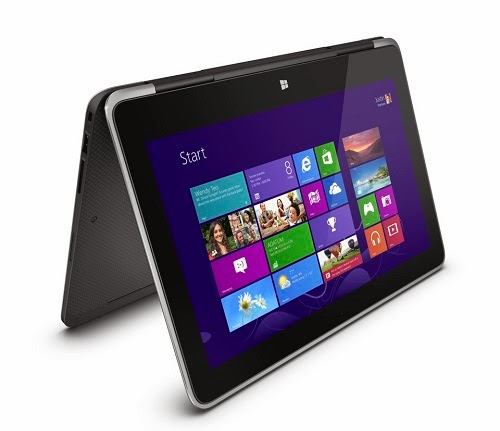
Dell XPS 11
--------------------------------------------------------------------------------------------------------------
Source
Subscribe to:
Posts (Atom)